![dark-1.png]](https://support.senturo.com/hs-fs/hubfs/dark-1.png?height=40&name=dark-1.png)
Overview
If a device has been Senturo Locked, you can remotely unlock it using either the individual device view or the main devices table. The Senturo Unlock command reverses a previously issued Senturo Lock, restoring access to the device. This feature works across ChromeOS, Windows, and macOS devices.
This article walks you through both methods for sending a Senturo Unlock command: unlocking a single device from its details page, or unlocking one or more devices in bulk from the Devices table.
Unlock from the Device Details Page
- Navigate to the Device
- Click on the device you want to unlock to open its detail view.
- Go to the Management Tab
- Click on the Management tab at the top right.
- Send the Unlock Command
- In the Security Actions section, click the UNLOCK button next to Senturo Unlock.
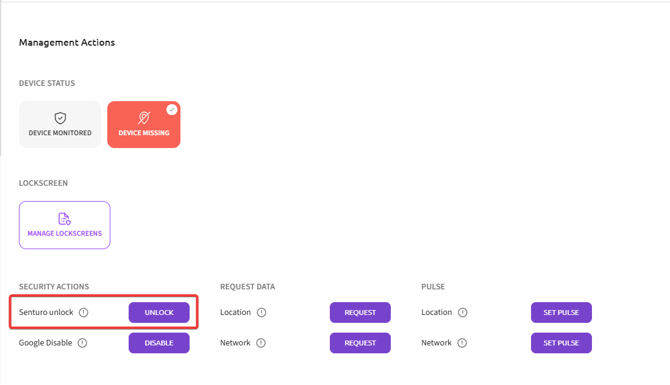
Unlock from the Devices Table (Mass Action)
- Select the Device(s)
- In the main Devices page, check the box next to the device(s) you want to unlock.
- Open the Security Actions Menu
- At the top, click on Security Actions.
- Choose Senturo Unlock
- From the dropdown, click on Senturo Unlock.
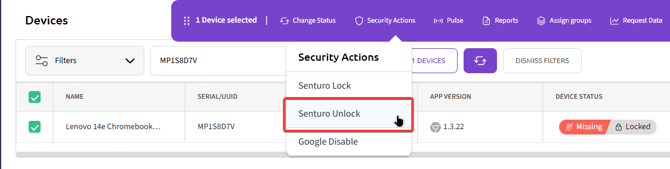
Conclusion
Using either the individual device page or the mass action from the Devices table, you can efficiently issue a Senturo Unlock command to restore access to previously locked devices across your fleet. This feature works on ChromeOS, Windows, and macOS devices, giving you a fast way to return devices to normal use once they are recovered or no longer at risk.
FAQs
Q: What does Senturo Unlock do? A: Senturo Unlock reverses the Senturo Lock command, restoring access to the device.
Q: How long does the unlock command take to apply? A: The unlock typically applies within a few seconds, depending on the device's connection status.
Q: Will Senturo Unlock work if the device is offline? A: The command will queue and apply as soon as the device reconnects to the internet.
Q: How do I lock a device in the first place? A: Use the Senturo Lock command from either the device details page or the Devices table. See How to Senturo Lock a Device for full steps.